🛠️ How does it work?
Install the .rbz plugin in SketchUp (Window → Extension Manager)
Open the plugin from Extensions → Mesh3D Optimizer
Import a 3D file (GLB, OBJ, FBX, STL, etc.)
Adjust reduction and texture quality, then insert into your model
Optimize heavy 3D models directly from SketchUp. Reduce polygons, compress textures, and insert with smoothed edges and locked component.
📥 Download SketchUp Plugin
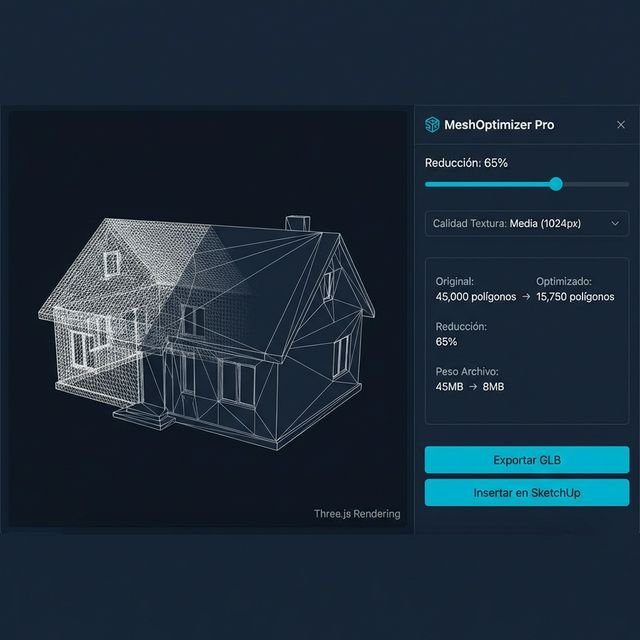
Vista previa del plugin Mesh3D Optimizer simplificando un modelo 3D en SketchUp
Intelligently reduce the polygon count of your 3D models while preserving shape and key visual details.
Compress model textures to 128, 256, 512, or 1024px. Drastically reduce file size without losing visual quality.
Supports GLB, GLTF, OBJ, FBX, STL, DAE and 3DS. Import any 3D model directly from the plugin dialog.
When inserting the optimized model into SketchUp, all edges are automatically smoothed for a solid, professional look.
Visualize the optimization result in an interactive Three.js viewport before inserting. Wireframe, rotation and comparison.
Install the .rbz plugin in SketchUp (Window → Extension Manager)
Open the plugin from Extensions → Mesh3D Optimizer
Import a 3D file (GLB, OBJ, FBX, STL, etc.)
Adjust reduction and texture quality, then insert into your model
"Increíble plugin. Reduje un modelo de 45MB a 8MB sin perder calidad visual. Ahora mi proyecto carga 5 veces más rápido en SketchUp."
"Lo uso diariamente para optimizar modelos GLB de Warehouse antes de insertarlos. Las aristas suavizadas automáticas son un detalle genial."
"Muy bueno y sobre todo gratis. El preview 3D en tiempo real te permite ver exactamente cuánto puedes reducir antes de aplicar. Recomendado."
Supports GLB, GLTF, OBJ, FBX, STL, DAE (Collada) and 3DS. GLB is the recommended format for its efficiency and compatibility.
No. The plugin compresses textures to your chosen resolution (128-1024px) but keeps them intact. The result is a much lighter file with visually equivalent textures.
No. The plugin automatically smooths all edges of the imported model, both in the component definition and sub-components. The result is a solid, clean appearance.
You can reduce up to 99% of polygons. In practice, reductions of 50-80% offer the best balance between visual quality and performance.